DMARC Monitoring That Just Works
Clear and actionable insights into your outbound email configuration and authentication. Quick to set up, easy to understand, rewarding to use.
In use at Fortune 100 and Fortune 500 companies, and by independent operators.
Why DMARC Monitoring Matters
Email Deliverability
Email providers require DMARC setup for inbox placement. Without proper email configuration (and authentication monitoring), email marketing campaigns and transactional messages may be rejected or marked as spam.
Brand Protection
Misconfigured email authentication and domain spoofing erodes customer trust and damages your brand. DMARC reporting tools give you the visibility you need to fix issues before they impact deliverability.
Actionable Insights
DMARC reports reveal who's sending email using your domain, both authorized and unauthorized. Understanding this activity is essential for maintaining email security and identifying potential threats.
The "Yahoogle" Mandate: Yahoo and Google Now Require DMARC
Since February 2024, Gmail and Yahoo have required DMARC for bulk senders (5,000+ messages/day) to reach the inbox. If you send transactional or marketing email at any volume, DMARC isn't optional. This tool won't set up your DMARC record for you, but once you have one published, it'll show you exactly who's sending mail that claims to be from your domain.
What's here
Simple DMARC aggregation with clear, actionable reporting. No account tiers, no upgrade prompts, no data caps.
- SPF, DKIM, and DMARC alignment insights
- Visual dashboards and reports
- Clean, actionable notifications
- Unlimited domains
- Unlimited data retention
- Fine-grained search, across your entire history
Who built this
I'm Chris Ricci. I've spent more than 25 years shipping software and running engineering teams, including at Amazon (part of the original Kindle launch), Sears, Dell, Rangespan (acquired by Google), and Holland & Barrett. Today I'm CTO at RVLVR and Indigenous Software, and advisor at Affinitiv.
DmarcSignal is a side project. I built it for my own domains and my consulting clients, and it's been useful enough that I've kept it open for anyone else who needs it. The same pipeline runs sh4meful.com. Both are free. I keep them running because they're technically interesting problems and because I use them.
If DmarcSignal is useful to you and you'd like to chip in toward hosting costs, you can buy me a coffee. Entirely optional — it stays free either way.
Based in Chicago. Reach me at info@dmarcsignal.com.
Simple Setup, Clear Results
DmarcSignal makes DMARC reporting intuitive and rewarding. Get the insights you need without the complexity you don't.
Quick to Set Up
Start receiving insights in minutes. DmarcSignal aggregates DMARC Aggregate (RUA) reports automatically. Just point your DMARC records and you're done.
Highly Visual
See your email authentication status at a glance. Clear charts and graphs make it easy to understand what's happening with your domain's email.
Actionable Reporting
Clean, focused reports highlight what matters. Know immediately when SPF, DKIM, or DMARC alignment issues need attention.
Smart Notifications
Get alerted to potential spoofing attempts and authentication failures. DmarcSignal prioritizes actionable information so you can respond quickly.
Data-Rich Insights
See who's sending email on behalf of your domain with geographic visualization and detailed breakdowns by source and authentication status.
How It Works
Up and running in three steps.
Create a Collector
A collector is a unique RUA email address where your DMARC reports will be sent. Set up one collector per domain, or point multiple domains at a single collector.
Update Your DMARC DNS Record
Add your collector address to your domain's DMARC DNS record. The DMARC lookup tool will show you exactly what to change.
See Your Results
Reports start arriving automatically. DmarcSignal parses and visualises them so you can see exactly who is sending email on behalf of your domain and how it's authenticating.
See It in Action
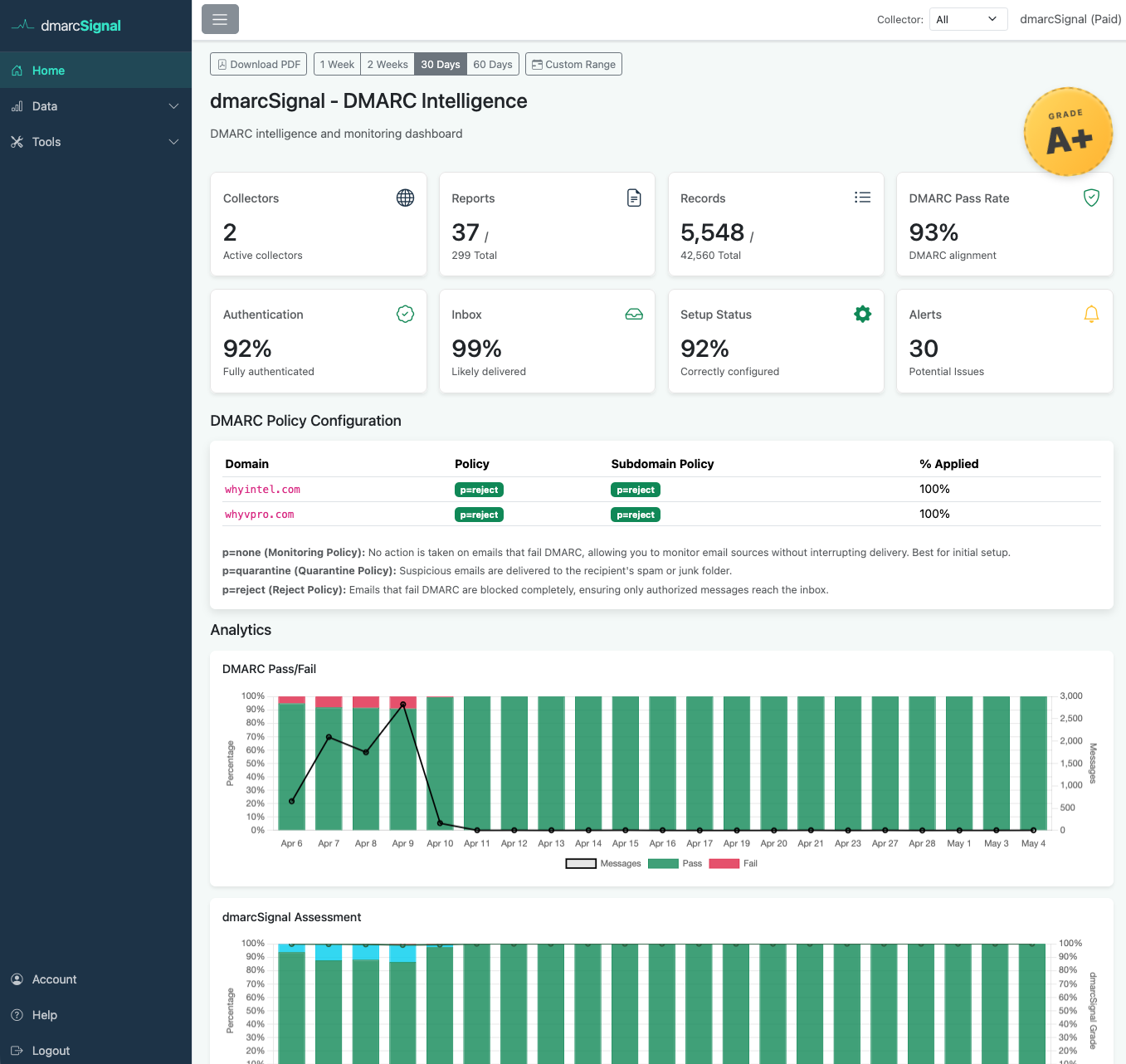
At-a-Glance Analytics
Your dashboard shows DMARC pass rates, authentication states, inbox likelihood, and alerts, across all your domains and collectors. Four configurable time ranges and custom date selection make trend analysis straightforward.
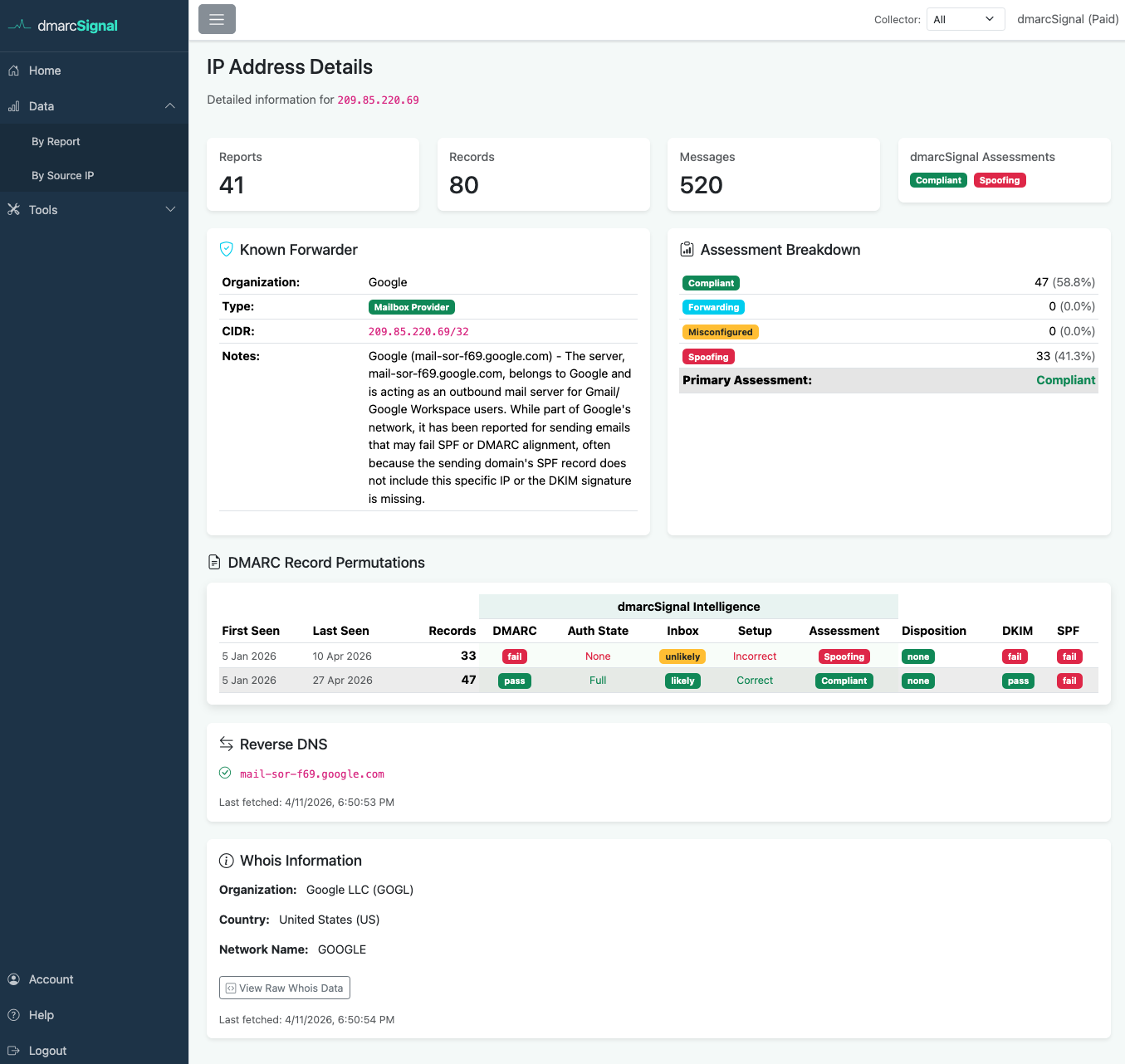
Deep IP Intelligence
Drill into any source IP to see who owns it, its geographic location, WHOIS registration details, reverse DNS, and a complete history of its DMARC authentication, all without leaving the app.